Fujifilm Pro 400H contact sheet
Make a contact sheet of your Fujifilm Pro 400H scans, with its edge print, frame numbers and DX code drawn the way they look on the negative.
Make a Fujifilm Pro 400H contact sheetThe film
Pro 400H was Fujifilm’s professional colour negative film, with a fourth colour layer that gave it its soft, pastel greens and clean skin tones. Fuji discontinued it in 2021, so every roll left is a treat.
- Made by
- Fujifilm
- Speed
- ISO 400
- Type
- Colour negative
- Process
- C-41
- Edge print
- PRO400H
- DX code
- Yes
On the edge
Its top edge is the busiest of any stock: the frame number, “PRO400H”, the half frame number, then FUJI, 126 or » in turn. Wide DX codes run along the bottom.
The DX code runs along the edge too, with the sprocket holes cutting through it the way they do on a real negative. Grain runs over all of it, since the edge print is exposed into the same emulsion as the pictures.
Film burn
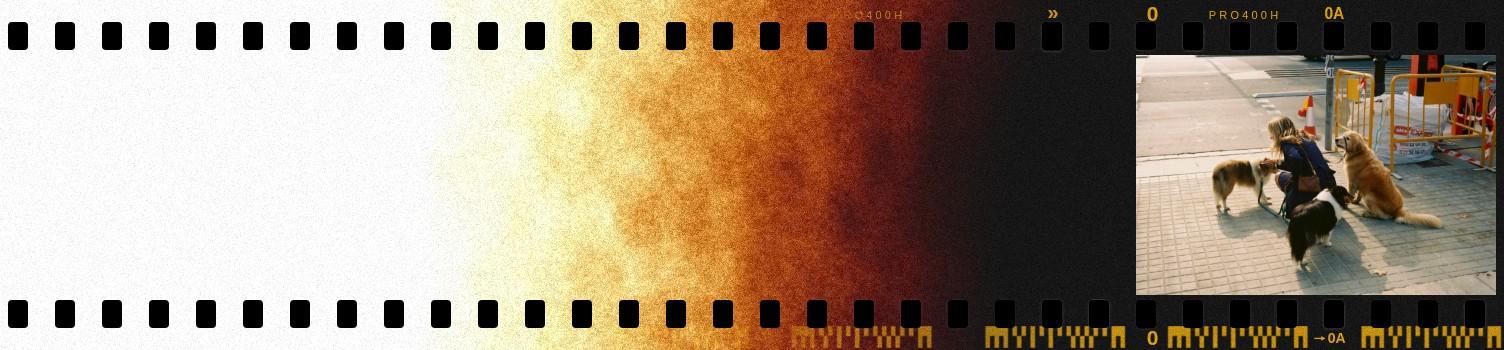
The first few frames of a roll get light while you load the camera, so they come back burnt: blown out where the light got in, fading to the clear base, with the edge print showing through. Film burn, first of the roll, a fogged leader: it’s the light leak everyone gets at the start of a roll, and Capa can draw it. Turn on Film burn in the extra settings and the sheet starts with three burnt frames, so your first photo lands on frame 0, like it does on the negative.
On colour negative the colour layers give way one after another, so the burn runs from white through yellow and orange to red before it fades out.
The burn is never the same twice. Every roll gets its own, uneven and grainy, so no two sheets look alike.
Make your own Fujifilm Pro 400H contact sheet
Add your scans, up to 42 frames, a whole roll on one page. Mark your keepers with a wax pencil, add a note, then download a PNG to share, or a Letter or A4 PDF to print and file with your negatives.